
– In Progress –
Introduction
This project will be the most grand addition to my home lab to date: the implementation of Wazuh integrated with a SOAR platform. This project is inspired by a lab concept I first came across in MyDFIR’s video, “5 FREE Cybersecurity Projects (Home Labs)”, and I have been genuinely excited and eager to get started. The idea of integrating Wazuh with a SOAR platform struck me as both intuitive and powerful, inspiring me to explore and expand on it further in my own home lab environment. Note that I plan to make this an ongoing project, updating this report as new developments and enhancements are made by myself, or possibly a future collaborator!
While the original video provided the idea, my goal is to expand on it a ton by setting up and customizing the implementation to fit my specific setup and learning objectives. In this in-depth lab project, I’m aiming to understand the processes thoroughly while adapting it as I progress.
A separate Full Report will be published once the Wazuh–SOAR integration is fully functional. For now, I’ll be maintaining this Live Log Report to document my daily progress, technical decisions, and lessons learned as the project continues to grow.
Stage 1
The first stage of this project focuses on gaining a solid understanding of the core tools, environments, and concepts involved — especially areas that are new to me, such as Security Orchestration, Automation, and Response (SOAR) platforms. My goal is to ensure I have the necessary theoretical and technical foundation before moving into hands-on integration work so I can fully understand the purpose of the project.
As part of this stage, I plan to:
- Research and note how SOAR platforms operate, with a focus on how Wazuh alerts can be processed and acted upon within Shuffle.
- Explore the features and configuration options of Wazuh to understand its alerting, data sources, and overall capabilities.
- Review Shuffle’s total workflow creation process, available connectors, and API integration potential.
- Understand how these can be integrated together as well as implementing TheHive for management
- Ensure my machines are functional environments
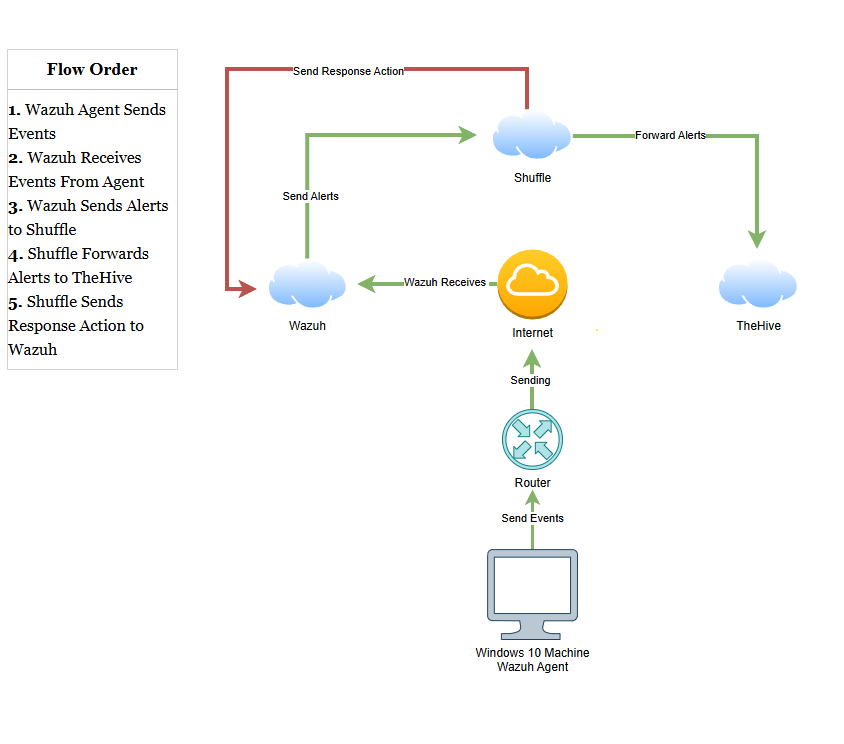
To support this understanding, I will create a very simple and high-level architecture diagram using a tool such as Draw.io. I plan to make the diagram:
- Visually represent the planned data flow from detection in Wazuh to automated response actions in Shuffle.
- Serve as both a development reference and a troubleshooting aid during deployment.
- Help identify possible integration points, dependencies, and maybe potential bottlenecks before they arise in practice.
I have learned overtime that a foundational stage such as this one is essential for clarity and for avoiding or correcting missteps later in the project. By establishing a clear technical roadmap and reference materials early, I will be able to move into development with more confidence, efficiency, and a reduced risk of rework. Note: this is just an initial diagram and does not have to be pretty yet. This will not be the diagram ready for presentation, it is only a broad overview and may change throughout future stages.
Stage 2
This was the stage where I intended to get everything up and running successfully, but it did not go as smoothly as I had anticipated. Every home lab encounters challenges, and this one involved a significant configuration mess that required me to take time to rethink my approach. I went back to MYDFIR’s videos to see his configuration and decided to use DigitalOcean since I won’t need this to be a permanent lab. Because using just the DigitalOcean trial which lasts for about two months will be sufficient for all of my documenting and learning. I decided this will be perfect for now as it will also be great to hands on practice with a cloud provider in the process, so I see this as another learning opportunity as well!
In reviewing others configurations for this and similar labs, I realized I will also want to scale this to include a case management platform. I decided to use TheHive as mine as I have previous experience with it from previous labs and BTL1. So now I will begin setting it up neatly, starting with a firewall setup on DigitalOcean.

After TONS more configuration issues and SSH connection errors when only allowing my public IP over TCP & UDP, I finally came across a solution – use PuTTY, the terminal emulator and network file transfer client.

With this step done, I can now fully setup and configure my home lab exactly how I want.
**UPDATE** My TheHive will not install in any way that I can think to try. More configuration issues are happening and I am actively learning how to fix this, thank you for your patience as I fight this battle.
